GUID Batch Update Tool
When to use it
Use this tool when the scene path or GUID recorded in the browser no longer matches the files in your project.
- After moving or renaming a scene, check whether its recorded path needs updating.
- After importing old data or migrating a project, check for missing or mismatched GUIDs.
- If the main window reports a missing scene file, check whether the original file can still be found.
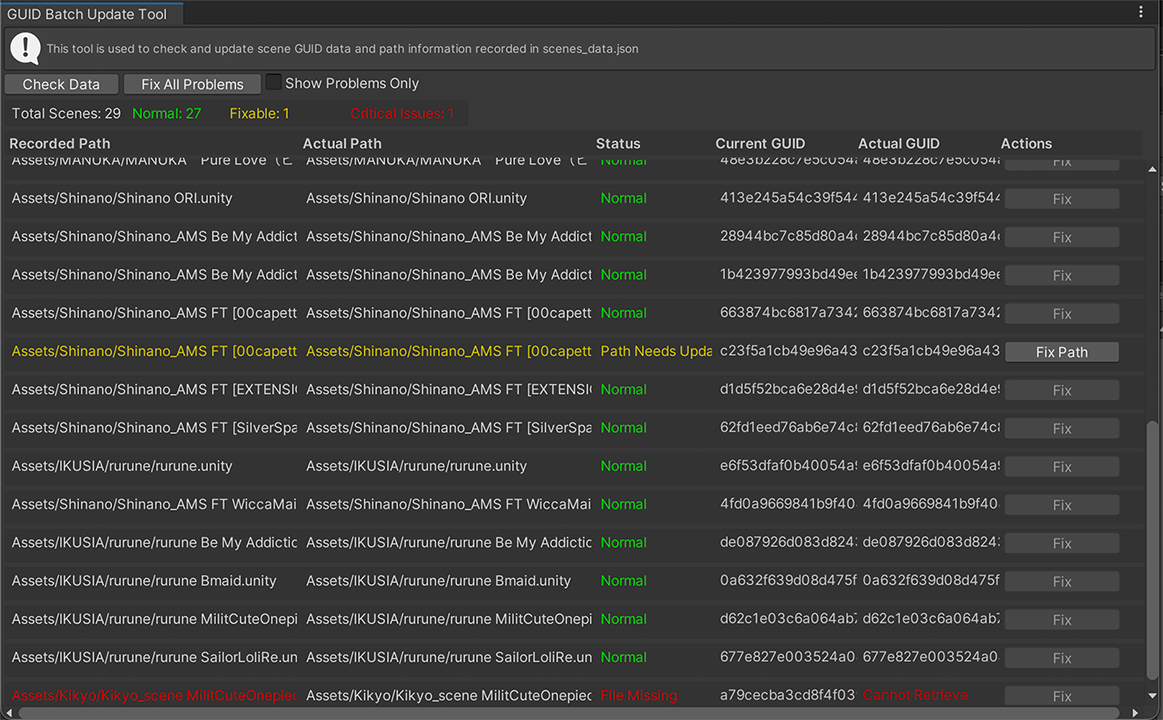
Opening the tool
- Click GUID Tool at the top of the main window.
- Or choose
Tools → CYN-lab → VRCAvatarSceneBrowser → GUID Batch Update Tool.
Interface and features
Buttons and status colors

- ① Check Data: reloads the scene records and checks whether their paths, GUIDs, and files match.
- ② Fix All Problems: after confirmation, repairs records whose files can still be found.
- ③ Show Problems Only: hides normal records so you can focus on items that need attention.
You can also click Fix on a row to repair just that record.
| Status | Color | Meaning | Action |
|---|---|---|---|
| Normal | Green | The path and GUID match, and the file exists | No action needed |
| Path Needs Update / Path Mismatch | Yellow | The file located by the GUID differs from the recorded path | Check the actual path, then fix the record |
| No GUID / GUID Needs Update | Yellow | The file exists, but its recorded GUID is missing or incorrect | Fix the GUID |
| File Missing | Red | Neither the recorded path nor the GUID can locate the scene | Check the original file or a backup |
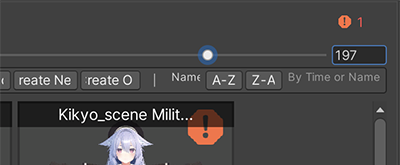
A missing scene file also produces an error icon on its thumbnail in the main window.
Data columns
| Column | Contents |
|---|---|
| Recorded path | The scene path saved in the browser |
| Actual path | The path found through the GUID |
| Status | The current check result |
| Current GUID | The GUID saved in the browser record |
| Actual GUID | The GUID of the current scene file |
| Action | Repairs the record when a fix is possible |
Notes
- Repairs modify the plugin's
Data/scenes_data.json. You can back up this file before proceeding. - Yellow means the record is inconsistent; the scene may still open. Check the actual path first.
- If neither the original path nor the GUID can find the file, the tool cannot restore the deleted scene.
- The tool handles scene records only. It does not restore missing avatar objects or screenshot images.